Epicenter logo_header_large.png

An official website of the State of Georgia.
The .gov means it’s official.
Local, state, and federal government websites often end in .gov. State of Georgia government websites and email systems use “georgia.gov” or “ga.gov” at the end of the address. Before sharing sensitive or personal information, make sure you’re on an official state website.
Still not sure?
Call 1-800-GEORGIA to verify that a website is an official website of the State of Georgia.
State charter schools are required to submit communications notices through Epicenter, the SCSC's compliance and data management system. Communications notices cover board composition changes, key personnel changes, financial conditions, legal matters, school calendar changes, bylaws amendments, education service provider agreements, called board meetings, and immediate notices.
Only assigned key personnel with active Epicenter accounts may submit communications notices.
Key personnel include: Highest-Level Administrator, School Leader/Principal, and Chief Financial Officer.
Visit School Communications Policy, FAQ & Procedures for the full communications policy and FAQs.
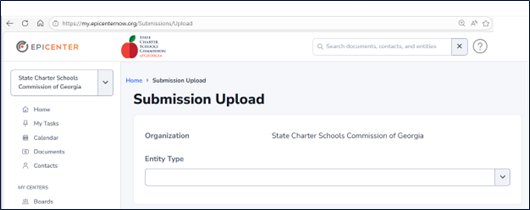
Navigate directly to the Epicenter submission upload page.
NOTE: If you are not already logged in, you will be prompted to do so before accessing the submission page.
Configure the following fields:
| Submission Type | Applicable Policy Condition |
|---|---|
| Called Board Meeting Notice | Governing board meeting scheduled with less than 24 hours' notice (Article II, Section 3) |
| General Notice – Bylaws | Any amendment to the governing board's bylaws (Article II, Section 1) |
| General Notice – Education Service Provider (ESP) | Intent to enter into any agreement or arrangement with the school's ESP, a subsidiary, or an affiliated entity not approved by the SCSC (Article II, Section 1) |
| General Notice – Financial | Debt, loan, or financing over $10,000; board-approved budget amendments causing a deficit or shortfall; financial conditions impacting the school's ability to operate (Article II, Section 1) |
| General Notice– Governing Board Composition* | Appointment or resignation of a governing board member (Article II, Section 1) |
| General Notice – Key Personnel Change* | Hiring, resignation, or separation of a Highest-Level Administrator, School Leader/Principal, or Chief Financial Officer (Article II, Section 1) |
| General Notice – Legal/Litigation or Investigation | Legal complaints, litigation, administrative hearings, or investigations involving the school or board members (Article II, Section 1) |
| General Notice – School Calendar | Establishment, adoption, or amendment of the school calendar (Article II, Section 1) |
| Immediate Notice | Circumstances requiring notification within 24 hours, including health/safety risks, program disruptions, school closures, and communication system outages (Article II, Section 2) |
After selecting an Entity, the details and instructions will be displayed. This includes a description of the relevant policy conditions and guidance for completing your submission.
Complete all required fields in the Submission section and select Submit.
Step 1: Complete all required fields, including whether the change is an addition or removal, the effective date, and the board member's full name.
Step 2: Update your school's board roster directly in Epicenter. For step-by-step instructions on adding or removing a board member, visit the Epicenter support page: Adding and Updating Board Members.
Both steps must be completed by the school to fulfill the communications notice requirement.
Step 1: Complete all required fields, including the individual's name, role, whether the change is an addition or removal, the effective date, contact email, and phone number.
Step 2: (completed by SCSC staff): SCSC staff will update your school's staff roster directly in Epicenter and create an Epicenter account for the new user. The new key personnel member (if applicable) will be contacted directly when their account has been created.
The instructions on the submission page provide additional details on role assignments, including guidance on designating a current key personnel to assume a vacated role.